


CloudWizard provides structured visibility into your AWS security and compliance posture using AWS‑native cross‑account access controls.
You sign in to the CloudWizard app, create a workspace for your organisation, and start with a free AWS security scan. From there, you can upgrade to Monthly or Annual Pro for ongoing visibility – the underlying access model remains the same: least‑privilege, read‑only, and AWS‑native.
No agents are deployed. No infrastructure is modified. No long‑lived credentials are required.
All access is explicit, temporary, auditable, and fully revocable.
Access Model
CloudWizard uses AWS cross‑account IAM roles in combination with AWS Security Token Service (STS).
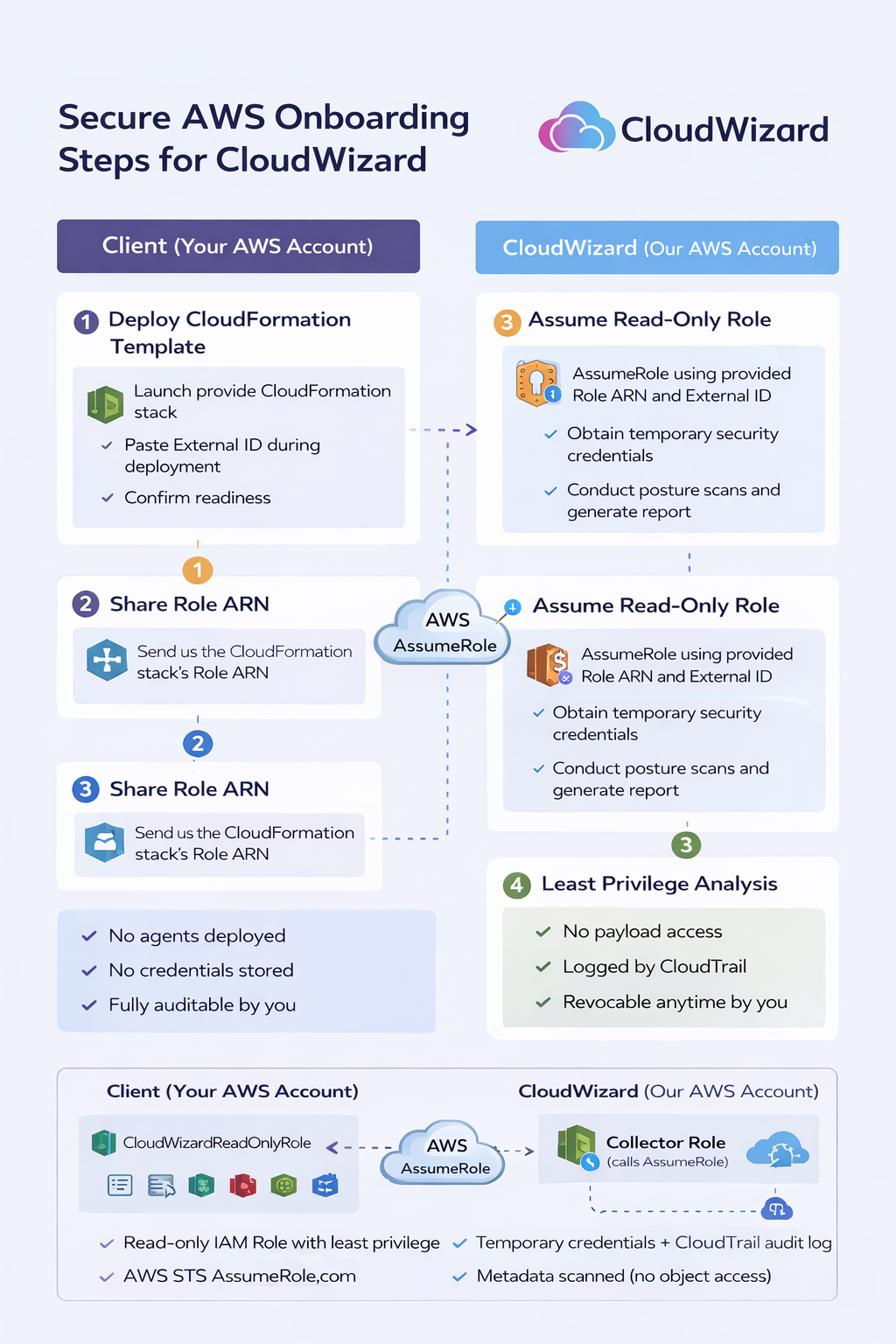
For each AWS account you connect, CloudWizard guides you (via the app) to deploy a CloudFormation stack that provisions a dedicated read‑only IAM role inside your AWS account. That role:
- Trusts only the CloudWizard AWS account
- Requires a unique External ID to protect against confused‑deputy abuse
- Grants read‑only visibility into security‑relevant configuration metadata
- Can be revoked at any time by your administrators
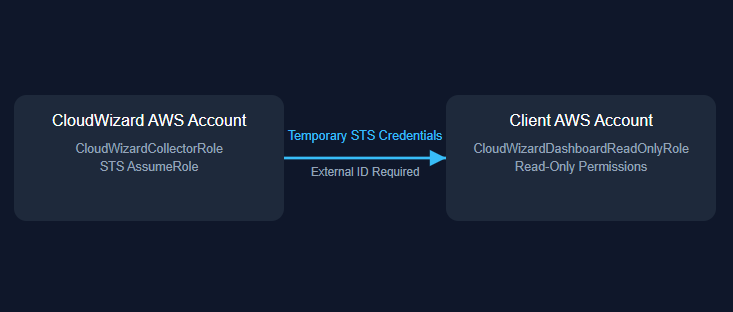
CloudWizard assumes this role using short‑lived STS credentials that automatically expire. No static IAM access keys are created or stored. All access occurs exclusively through standard AWS API calls from the CloudWizard AWS account to yours.
This model aligns with AWS‑recommended cross‑account security architecture and is widely used by enterprise security tooling providers and audit firms.
Scope of Access
CloudWizard analyses infrastructure configuration and security posture data, including:
- IAM role and policy structure
- Encryption enforcement configuration (at rest and in transit)
- Public exposure settings across core AWS services
- Logging and monitoring posture (for example CloudTrail and Config)
- Security Hub and GuardDuty findings where enabled
- Compliance control alignment for common frameworks and customer questionnaires
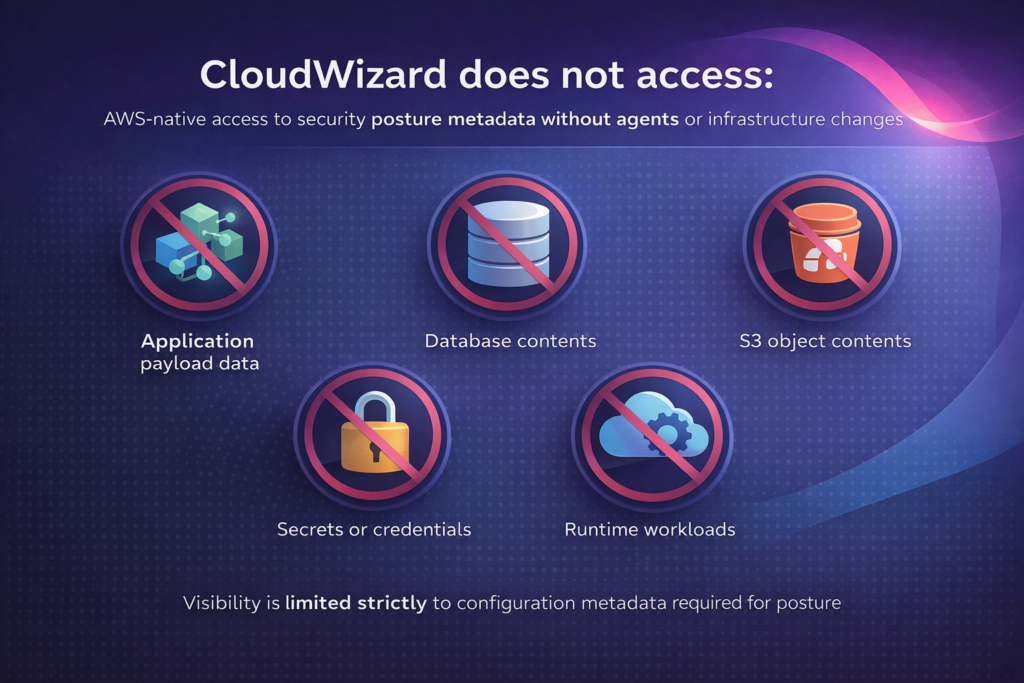
CloudWizard does not access:
- Application payload data
- Database contents
- S3 object contents
- Secrets or credentials
- Runtime workloads
Visibility is limited strictly to configuration metadata required for posture analysis.[web:12]
Security Controls
Access is governed by the following safeguards:
- Least‑privilege permissions limited to read‑only API actions (Describe, List, Get)
- Unique External ID per client to prevent unauthorised role assumption
- Short‑lived STS credentials that expire automatically
- Full audit logging through AWS CloudTrail for all role assumptions and API activity
- Immediate revocation capability via IAM role modification or removal
The role cannot create, modify, or delete resources.
Operational Model
CloudWizard operates entirely through AWS APIs. No agents, sidecars, or services are deployed into your infrastructure. Your runtime environment remains unchanged.
This approach ensures:
- No additional attack surface introduced by the tool
- No ongoing operational overhead to run or patch CloudWizard components
- No performance impact on your applications or data plane
- No infrastructure drift caused by the scanning process
Clients retain full administrative control of their AWS environment at all times.
Alignment with AWS Best Practices
The CloudWizard access architecture aligns with AWS Well‑Architected security principles, including:
- Explicit trust relationships defined in IAM role trust policies
- Role‑based access control, rather than user‑bound long‑lived credentials
- Short‑lived credentials via STS, avoiding static access keys
- Comprehensive audit logging via CloudTrail
- Least‑privilege design focused on read‑only configuration access
Security tooling should enhance visibility without increasing operational risk. CloudWizard is designed accordingly: you authenticate to the CloudWizard app, connect AWS via a tightly scoped cross‑account role, and can revoke that access at any time.
Reference Documentation
- AWS STS AssumeRole (API) —
https://docs.aws.amazon.com/STS/latest/APIReference/API_AssumeRole.html
- AWS External ID (confused deputy protection) —
https://docs.aws.amazon.com/IAM/latest/UserGuide/id_roles_create_for-user_externalid.html
- IAM Roles (how role trust works) —
https://docs.aws.amazon.com/IAM/latest/UserGuide/id_roles.html
- CloudTrail logging (audit access) —
https://docs.aws.amazon.com/awscloudtrail/latest/userguide/cloudtrail-user-guide.html
- IAM policy evaluation logic —
https://docs.aws.amazon.com/IAM/latest/UserGuide/reference_policies_evaluation-logic.html
CloudWizard provides structured visibility into your AWS security and compliance posture using AWS‑native cross‑account access controls.
You sign in to the CloudWizard app, create a workspace for your organisation, and start with a free AWS security scan. From there, you can upgrade to Monthly or Annual Pro for ongoing visibility – the underlying access model remains the same: least‑privilege, read‑only, and AWS‑native.
No agents are deployed. No infrastructure is modified. No long‑lived credentials are required.
All access is explicit, temporary, auditable, and fully revocable.
Access Model
CloudWizard uses AWS cross‑account IAM roles in combination with AWS Security Token Service (STS).
For each AWS account you connect, CloudWizard guides you (via the app) to deploy a CloudFormation stack that provisions a dedicated read‑only IAM role inside your AWS account. That role:
- Trusts only the CloudWizard AWS account
- Requires a unique External ID to protect against confused‑deputy abuse
- Grants read‑only visibility into security‑relevant configuration metadata
- Can be revoked at any time by your administrators
CloudWizard assumes this role using short‑lived STS credentials that automatically expire. No static IAM access keys are created or stored. All access occurs exclusively through standard AWS API calls from the CloudWizard AWS account to yours.
This model aligns with AWS‑recommended cross‑account security architecture and is widely used by enterprise security tooling providers and audit firms.
Scope of Access
CloudWizard analyses infrastructure configuration and security posture data, including:
- IAM role and policy structure
- Encryption enforcement configuration (at rest and in transit)
- Public exposure settings across core AWS services
- Logging and monitoring posture (for example CloudTrail and Config)
- Security Hub and GuardDuty findings where enabled
- Compliance control alignment for common frameworks and customer questionnaires
CloudWizard does not access:
- Application payload data
- Database contents
- S3 object contents
- Secrets or credentials
- Runtime workloads
Visibility is limited strictly to configuration metadata required for posture analysis.[web:12]
Security Controls
Access is governed by the following safeguards:
- Least‑privilege permissions limited to read‑only API actions (Describe, List, Get)
- Unique External ID per client to prevent unauthorised role assumption
- Short‑lived STS credentials that expire automatically
- Full audit logging through AWS CloudTrail for all role assumptions and API activity
- Immediate revocation capability via IAM role modification or removal
The role cannot create, modify, or delete resources.
Operational Model
CloudWizard operates entirely through AWS APIs. No agents, sidecars, or services are deployed into your infrastructure. Your runtime environment remains unchanged.
This approach ensures:
- No additional attack surface introduced by the tool
- No ongoing operational overhead to run or patch CloudWizard components
- No performance impact on your applications or data plane
- No infrastructure drift caused by the scanning process
Clients retain full administrative control of their AWS environment at all times.
Alignment with AWS Best Practices
The CloudWizard access architecture aligns with AWS Well‑Architected security principles, including:
- Explicit trust relationships defined in IAM role trust policies
- Role‑based access control, rather than user‑bound long‑lived credentials
- Short‑lived credentials via STS, avoiding static access keys
- Comprehensive audit logging via CloudTrail
- Least‑privilege design focused on read‑only configuration access
Security tooling should enhance visibility without increasing operational risk. CloudWizard is designed accordingly: you authenticate to the CloudWizard app, connect AWS via a tightly scoped cross‑account role, and can revoke that access at any time.
Reference Documentation
- AWS STS AssumeRole (API) —
https://docs.aws.amazon.com/STS/latest/APIReference/API_AssumeRole.html
- AWS External ID (confused deputy protection) —
https://docs.aws.amazon.com/IAM/latest/UserGuide/id_roles_create_for-user_externalid.html
- IAM Roles (how role trust works) —
https://docs.aws.amazon.com/IAM/latest/UserGuide/id_roles.html
- CloudTrail logging (audit access) —
https://docs.aws.amazon.com/awscloudtrail/latest/userguide/cloudtrail-user-guide.html
- IAM policy evaluation logic —
https://docs.aws.amazon.com/IAM/latest/UserGuide/reference_policies_evaluation-logic.html